How to check Google index status without the Custom Search API
For years, many index checkers answered one question — is this URL in Google? — by sending queries through the Custom Search JSON API. That route is closing. If you need to check Google index status without the Custom Search API, the right replacement depends on whose pages you are checking and how many of them there are.
site: operator is a quick look, not proof.What changed with the Custom Search JSON API
Google's overview page for the Custom Search JSON API now states that the API is closed to new customers. Teams that already use it have until January 1, 2027 to move to an alternative. The page names Vertex AI Search as the option for searching across up to 50 domains, and the API itself still lists 100 search queries per day for free for existing customers.
That matters for index checking because many scripts, spreadsheets and SaaS tools built their "indexed / not indexed" column on top of this API. They sent a query for the exact URL, looked at whether the result came back, and wrote the answer into a report. Once the API stops answering, those reports stop updating — often silently, with every row showing an error or an empty value.
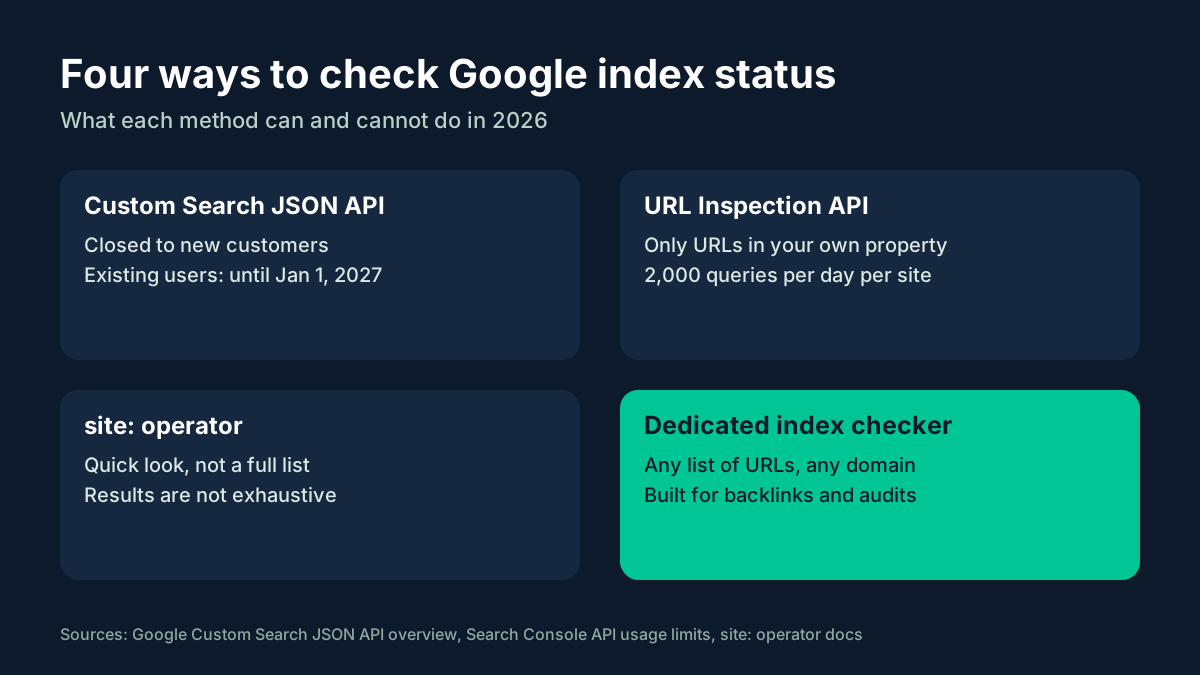
The four options, side by side
1. URL Inspection API — for your own property
The Search Console URL Inspection API returns Google's own view of a URL: whether it is indexed, the coverage state, the last crawl and more. It is the most authoritative answer you can get, but it has two limits that rule it out for many jobs. First, the inspected URL must belong to the Search Console property you pass as siteUrl. Second, the quota is 2,000 inspections per day and 600 per minute for each site. The details and a planning method are on the page about URL Inspection API limits.
2. Vertex AI Search — for search over domains you configure
Google points Custom Search users to Vertex AI Search when they need search across up to 50 domains. That is a replacement for a search box, not for an index report: it answers queries over content you set up, and it does not tell you whether a page on someone else's site is in Google's index. See Vertex AI Search for index checks for where it fits.
3. The site: operator — for a quick look
Typing site:example.com/page into Google is the oldest manual check there is. Google's documentation is clear that the results of a site: query are not guaranteed to be complete, so an empty result is not proof that a page is missing from the index. The page on the site: operator as an index check explains how to use it without drawing the wrong conclusion.
4. A dedicated index checker — for backlinks and large lists
When the URLs belong to other sites — guest posts, profiles, Web 2.0 pages, links bought or earned — Search Console cannot help, because you cannot add someone else's domain to your account. This is the job dedicated checkers are built for: you upload a list, they return a status per URL. If you prefer to automate it, the guide to a bulk index check in Python shows a script structure that works with any provider.
Choose by the job, not by the tool
- "Are my own new pages indexed?" Use the URL Inspection API or the URL Inspection tool in Search Console. Budget the daily quota for new and changed URLs first.
- "Are my backlinks indexed?" Use a dedicated index checker. Your links live on other people's properties, so the URL Inspection API will refuse them.
- "Does this section show up at all?" A
site:query gives a fast impression. Confirm anything important with a proper check. - "I need a search box across my sites." That is what Vertex AI Search is for. It is not an index monitor.
Migrating an existing checker
If you maintain a script or an internal tool that depends on the Custom Search JSON API, plan the move before the deadline rather than after the first failed run.
- Inventory the calls. Find every place that sends a query to the API: cron jobs, spreadsheet add-ons, dashboards, client reports.
- Split the URL lists by owner. URLs in properties you control can move to the URL Inspection API. URLs on third-party sites need another checker.
- Swap the data source behind one function. Keep the rest of the pipeline — input lists, storage, alerts — unchanged, so the switch is a small, testable change.
- Run old and new side by side on the same sample while you still can, and compare the results.
- Remove the old key once the new source has run cleanly for a few cycles.
A longer walkthrough of the API side, including request and response shapes, is collected in this hub on the index checker API after the Custom Search shutdown. For a non-technical view of the same move, there are step-by-step migration notes written for teams that rely on reports rather than code.
What to do when a URL is not indexed
An index check is only useful if it leads to an action. When a page you care about comes back as not indexed, work through the usual causes before you resubmit anything:
- A
noindexrule in a meta tag or anX-Robots-Tagheader. - A
robots.txtblock. Note that robots.txt controls crawling; Google's documentation says it is not a mechanism for keeping a page out of Google. - A canonical pointing elsewhere, so Google indexes a different URL instead.
- A redirect or an error status, including soft 404 pages that return 200 but look empty.
- Thin or duplicate content that gives Google little reason to keep the page.
Fix the cause first, then check again after a reasonable interval. Rechecking the same URL every hour adds load without adding information.
Guides on this site
- Check Google index status without the Custom Search API — the overview and how to choose a method.
- URL Inspection API limits — 2,000 inspections per property per day and the scope rule.
- Vertex AI Search for index checks — what Google's suggested alternative is built for.
- The site: operator as an index check — what it shows and what it misses.
- Bulk index check in Python — a safe script structure with batches and retries.
FAQ
When does the Custom Search JSON API stop working?
It is already closed to new customers. Google says existing customers have until January 1, 2027 to transition to an alternative.
Can the URL Inspection API check backlinks?
No. The URL you inspect must be under the property you pass as siteUrl, so pages on other domains are out of scope.
Is an empty site: result proof that a page is not indexed?
No. Google states that site: results are not guaranteed to be complete. Use it as a hint and confirm with a dedicated check.
Sources
https://developers.google.com/custom-search/v1/overviewhttps://developers.google.com/webmaster-tools/limitshttps://developers.google.com/webmaster-tools/v1/urlInspection.index/inspecthttps://developers.google.com/search/docs/monitor-debug/search-operators/all-search-sitehttps://developers.google.com/search/docs/crawling-indexing/robots/intro